More features hadn’t made hiring easier.
Indeed had tools to help employers attract and assess candidates. As we added more, there was also more for employers to learn and manage.
Leadership gave our SMB Labs team a brief: “Do It For Me.” Could we do more of the work for employers? We had six months to explore the idea, test it, launch an MVP, and make the case for continued funding.
What should the system do—and where should the employer stay involved?
We looked at candidate quantity and quality, how to explain what the assistant was doing, and which decisions employers needed to make themselves.
Work across the hiring journey.
Help the team make decisions.
I worked on the employer journey and planned and facilitated the design sprint. After the sprint, I continued working with research and coaching designers.
End-to-end UX
I worked with the team on how the screens and tasks fit together, and with research on testing and revising prototypes. My ongoing focus included the end-to-end flow and interview experience.
We needed to decide what the assistant could do automatically and where to ask employers for preferences or approval.
Sprint & team leadership
I aligned the scope with product, engineering, and UX leadership, planned the remote sprint, and prepared facilitators to lead the group activities.
After the sprint, I met weekly with Mikako and Jimmy to review their designs, offer feedback, and check how their work fitted into the rest of the app.
Who I worked with. Adrienne was my research partner. Mikako focused on onboarding and Jimmy on candidate quality, alongside our product, content, and engineering colleagues. My leadership role on this project was facilitation and mentoring.
Prepare a remote sprint.
Help 40+ people contribute.
It was early in the pandemic, and my first fully remote sprint with a group this large. I combined design-sprint activities with the Double Diamond and Lean Canvas to help us organise and discuss ideas.
Two weeks before the sprint, I agreed the scope with leadership and brought in product experts and internal recruiters. I spent about a week preparing the facilitators, including colleagues who hadn’t done it before.
Adrienne and I arranged live employer interviews. The group could ask questions and record what they heard in empathy maps, then refer back to those problems as they developed ideas.
We combined the ideas into a flow and reviewed it with product colleagues. By day four, we knew which screens to design.
Split the work.
Keep it one journey.
We divided the key screens between people so they could design in parallel. The names on the flow made it clear who was taking each part forward during the sprint.
As facilitator, I helped the group turn our shared flow into work we could take on. I also worked on the assistant introduction, approval, and candidate-feedback steps.
We regrouped every couple of hours for design critiques. I used those reviews to help us iterate and check how one person’s screens connected to the next. By day five, we had a prototype.
Who was working on each part.
Read the flow and assignments
- Corey
Post a job
Start with a preview or a pre-filled job.
- Didier
Introduce the assistant
After sponsorship, explain the assistant and its automatic optimisations.
- Didier
Ask for approval
Recommend changes to requirements or sponsorship, with employer approval.
- Didier · Adrienne
Rate three candidates
Learn what the employer likes and dislikes.
- Corey
Wait for candidates
Explore showing actions already taken while the employer waits.
- David
Send an email
A next-day notification brings the employer back to the candidates.
- Mikako
Review the shortlist
Group candidates into a smart list. A desktop comparison prototype was a parallel exploration with Wayne.
- Adrienne
Open a candidate’s details
Move from the shortlist into an individual profile.
From the flow to a prototype.
These are three screens from that first prototype: introducing the assistant, explaining its proposed actions, and reviewing a shortlist. We could now test the journey with employers.
Our first prototype, before the later MVP iterations. Enlarge any preview to see the full scrolling screen.
Keep testing after the sprint.
Find out what needs to change.
Adrienne and I planned the research approach together. We tested prototypes and asked benchmark questions after sessions to check whether the designs addressed the problems we’d identified.
We changed the prototype daily, adding and removing screens and working with our content strategist on the wording. We worked through five prototype versions, ending with the MVP direction.
From a star rating to a question about fit.
The first prototype asked employers to rate a candidate with stars. By the MVP, we explained how their feedback would affect recommendations and asked something more specific: would they consider a job seeker like this?
An overall rating
Would you consider someone like this?
What changed
The question moved from rating an individual to describing the kind of candidate the employer would consider. The explanation also made clear what the assistant would use the answer for.
This shows the change in the interaction. I don’t have testing results for this specific change, so I can’t say whether it improved usability.
See more onboarding screens and prototype boards
These previews show the top of the original scrolling screens. Enlarge them to see the full versions.
Set interview preferences.
Let the assistant work around them.
I continued working on the end-to-end flow and interviews. In scheduling, employers could choose the interview format, duration, and recurring availability in one place.
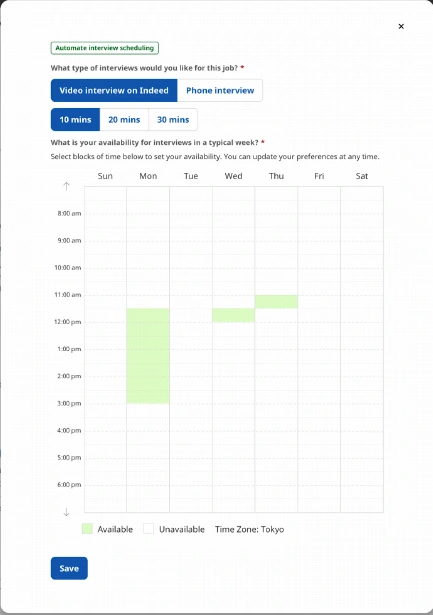
How, how long, and when?
Employers choose a format and duration, then mark available times on a weekly grid and save.
The assistant can arrange interviews within those preferences, rather than deciding everything for the employer.
Original product screen.
The daily-summary email brought employers back to review recommended candidates. This was part of the wider team’s work, connecting the email and in-app experience.
We took the concept into production in six months.
The project received an extension to its funding window. We continued developing the product through 2021, and what we learned informed Indeed’s direct-to-interview work.
| Measure | Self-serve | Self-serve + VREC | VREC only |
|---|---|---|---|
| Jobs with >10 qualified applications by day 3 | 52% | 54% | 62% |
| Interviews scheduled / advertiser | 10% | 16% | 22% |
These 2022 figures compare the products, not the impact of my designs alone. I don’t have sample sizes, group-assignment details, or uncertainty estimates for these comparisons. Interview scheduling is a separate measure from candidate quality.
The sprint got us started. The work continued afterwards.
I helped a large remote group put together a flow we could test. The follow-up work mattered just as much: testing prototypes, reviewing designs, and checking how the different parts fitted together.
The question I kept coming back to was: how do we do more for the employer without taking away their control? That affected everything from candidate feedback to interview availability.
About the source material
- Project presentation and notes · 2022
- Résumé · Indeed experience